


If you’ve just switched from Windows to macOS (possibly because the affordable MacBook Neo has won you over), there’s a lot to learn. While the two operating systems have plenty of similarities, there are many ways in which they do things a little differently – and you might have questions about how exactly Apple’s software works.
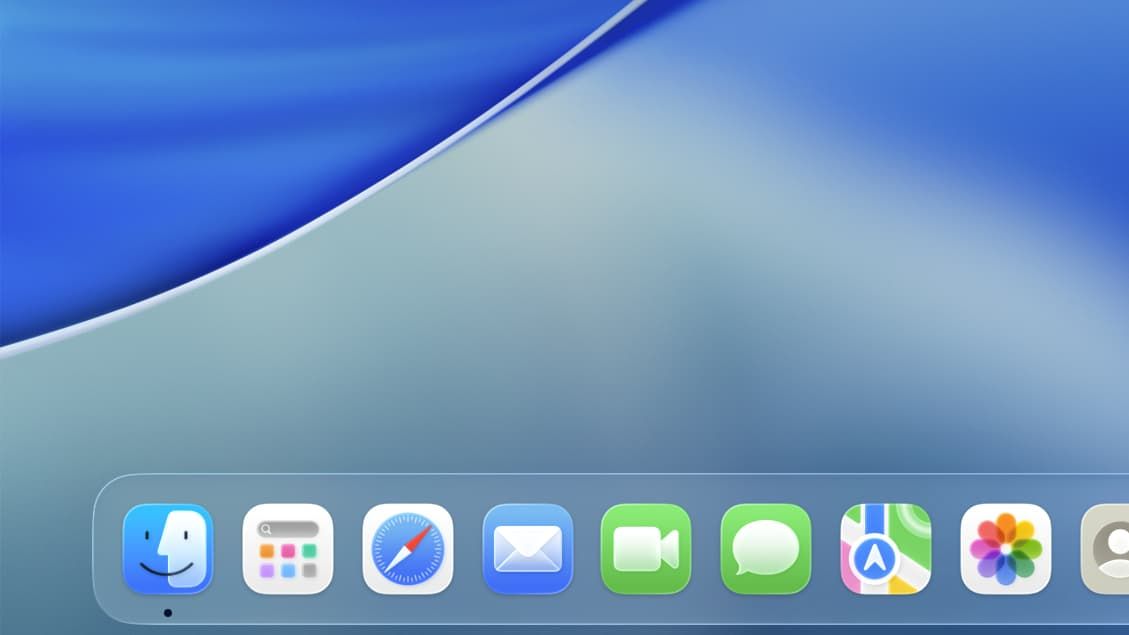
One of the key elements you’ll want to learn about is the macOS Dock. On the surface, this might look similar to the Windows taskbar, and that makes it a good place to start learning about macOS. Here, we’ll show you what the Dock is, how it works, and how you can customize it to make it your own.
What is the Dock?
Like the Windows taskbar, one of the Dock’s primary functions is to store your favorite apps. That gives you a quick way to launch apps, switch between them, and shut them down. To open an app, just click its icon as you would in Windows. Flicking between apps is as simple as clicking the Dock icon of an open app (you can tell it is open by the small dot that appears below its icon). To close an app, right-click its icon and select Quit. Depending on the app, this right-click menu might show extra choices, like opening a new window in Finder.
Article continues below
By default, the macOS Dock is loaded with a selection of Apple’s apps, the Downloads folder, and the Trash (unlike Windows, the Trash sits in the Dock rather than on your desktop). You can change which apps are present in the Dock – we’ll come back to that later – so you don’t have to stick with Apple’s layout.
As the Downloads folder shows, the Dock can hold more than just apps. The right-hand section of the Dock, which is divided by a separator, can hold files, folders and more. That gives you quick access to items that you regularly use, saving you the need to regularly rummage through folders in search of them.
Any apps that want to alert you to something will have a red badge on their Dock icon. For example, if you have an unread message in the Mail app, you’ll see a red ‘1’ appear on the Dock icon. That way, the Dock doubles up as a basic notification system.
Finally, it’s also a way to close unresponsive apps. When an app freezes, you can close it – or ‘force quit’ it – by right-clicking the icon of the frozen app in the Dock and clicking Force Quit.
How does the Dock compare to Windows 11’s taskbar?

As we alluded to earlier, the Dock and Windows 11’s taskbar have some common aspects. Like the taskbar, for example, the Dock is also a way to quickly access and open apps. By default, both the Dock and the taskbar sit at the bottom of your screen, too.
One of the most famous parts of Windows’ taskbar is the Start button. The Dock, on the other hand, has the Apps button (in macOS Tahoe or later) or the Launchpad (in macOS Sequoia and earlier). These work in slightly different ways but are broadly similar in that they’re a quick way to find all of your installed apps.
One key difference is that the Windows taskbar has a search box, which the Dock lacks. That doesn’t mean macOS lacks a search feature, though – in macOS, you can bring up the Spotlight search feature by pressing the Command + Space keyboard shortcut. In macOS Tahoe or later, you can also find a Spotlight search bar by clicking the Apps icon in the Dock.
Apple is known for the tight integration of its devices. If you are using an iPhone, iPad, or Apple Watch alongside your Mac (and you’re using the same Apple Account on all your devices), you’ll see an app icon of your currently open iPhone, iPad or Apple Watch app appear in your Dock. Click this icon and you can open the app on your Mac. This feature is part of Apple’s Handoff system.
There are other useful Dock features that are a little different to Windows. If you drag a file over an app icon in the Dock and then let go of it, for instance, macOS will open the file in the app you chose. If you hold the Command key and click a Dock app or file, Finder will open with the app/file’s location shown. Or hold the Option key and click a Dock item to hide that app and show the previously open app instead. Finally, if you want to switch to an app and hide every other open app, hold both Option and Command, then click the app icon that you want to switch to.
How do you customize the Dock?

So, how do you start making changes to the macOS Dock? After all, you might not want to just stick with Apple’s preset look and feel.
One of the most basic changes you can make is to add apps and remove others that you no longer need. Adding an app or file is easy – just drag it onto the Dock and let go (you can drag apps from the Applications folder, which is found on the left-hand side of the Finder app, or by clicking the Apps icon in your Dock). Or open an app, right-click its icon in the Dock, then select Options > Keep in Dock.
If you want to reorder Dock apps rather than add more, they can also be dragged into new positions.
To remove something from the Dock, all you have to do is click and hold it, then drag it out of the Dock. After holding it outside the Dock for a second, you’ll see the word Remove appear above the icon. Let go of your mouse button, and the app will be removed from the Dock. And don’t worry, the app itself is not uninstalled from your Mac when you do this. Alternatively, you can right-click an item in your Dock and select Options > Remove from Dock.
There are a few other ways to adjust the Dock. First, move your mouse pointer over the vertical dividing line on the right-hand side of the Dock. The pointer should become an upward and downward-facing arrow. Now right-click. You’ll see some options:
- Turn Hiding On will automatically hide the Dock until you move your mouse pointer to where the Dock used to be (usually the bottom of the screen), whereupon it will reappear
- Turn Magnification On scales up app icons as you mouse over them, making them easier to identify
- Position on Screen will move the Dock to the left, bottom or right-hand side of your display, depending on your choice
- Minimize Using gives you two choices: Genie Effect, which makes apps appear to flow into the Dock as they’re minimized, or Scale Effect, which uses a simpler effect to shrink the app when it is minimized
- You can open the Dock’s controls in the System Settings app by clicking Dock Settings. We’ll address that in more detail below
Adjust Dock settings

If you want to dig deeper, you’ll find a large array of options in the System Settings app. There are a few ways you can open the System Settings app. It’s the cog icon in the Dock, for one thing. Or click the Apple logo in the top-left corner of your screen and select System Settings. Once System Settings opens, click Desktop & Dock in its left-hand sidebar.
The Dock’s settings are located at the top of the Desktop & Dock section. Use the Size slider to increase or decrease the size of the Dock. The Magnification slider next to it controls how large icons are magnified when you mouse over them. You’ll need to enable magnification first, as detailed in the ‘How do you customize the Dock?’ section above.
Below the two sliders are several more options. You can change the Dock’s position on your screen, alter the minimizing animation, and choose whether apps minimize into the right-hand section of the Dock or into their own app icons.
The ‘Window title bar double-click action’ determines what happens when you double-click the top of an app window (this is the title bar – it stretches across the top of an app at around the height of the red, yellow and green buttons in the top-left corner). You can increase the window’s size, minimize it, make it fill the screen, or set it to do nothing.
There are a few more options at the bottom of the Dock section in System Settings. These include automatically hiding and showing the Dock; adding a bouncing animation to icons when you open an app; showing dots under Dock icons to indicate that an app is open; and showing suggested and recent apps on the right-hand side of the Dock.
As you can see, the Dock is a very feature-rich aspect of macOS, despite appearing unassuming at first glance. Learn how it works and you’ll have a powerful operating system tool at your fingertips.
Follow TechRadar on Google News and add us as a preferred source to get our expert news, reviews, and opinion in your feeds. Make sure to click the Follow button!
And of course you can also follow TechRadar on TikTok for news, reviews, unboxings in video form, and get regular updates from us on WhatsApp too.

