


Apple announced a clutch of new laptops last week, and two models in particular will catch the eye of the typical consumer: the MacBook Air M5 and MacBook Neo.
The former is the latest instalment in what was Apple‘s most affordable MacBook line-up, while the latter now takes the crown of the most wallet-friendly laptop in Apple’s roster.
Clearly, though, Apple has made compromises in the spec of the Neo, which starts at $599 / £599 / AU$899 for the entry-level laptop, making it by far the cheapest MacBook ever seen (at launch). The MacBook Air M5, meanwhile, starts at $1,099 / £1,099 / AU$1,799 for the 13-inch version.
If you want to know the main differences between these two Apple laptops, that’s exactly what we’re going to cover in this concise roundup of comparative specs.
First, we’ll outline the key specs in a head-to-head table, before moving on to discuss these points in more depth. We’ll weigh up the relative merits of both these new MacBooks, so you can see which might be better suited to your needs overall.
MacBook Neo vs MacBook Air M5: Base specs
| Header Cell – Column 0 |
MacBook Neo |
MacBook Air M5 13-inch |
|---|---|---|
|
Processor |
A18 Pro (6‑core CPU, 5‑core GPU, 16-core Neural Engine) |
M5 (10‑core CPU, 8‑core GPU, 16-core Neural Engine) |
|
RAM |
8GB |
16GB |
|
Storage |
256GB |
512GB |
|
Display |
13-inch Liquid Retina (2,408 x 1,506 resolution) |
13.6-inch Liquid Retina (2,560 x 1,664 resolution) |
|
Price |
$599 / £599 / AU$899 |
$1,099 / £1,099 / AU$1,799 |
MacBook Neo vs MacBook Air M5: Design

Apple’s MacBook Air M5 retains the same design as its predecessor with the M4 chip. That’s not a negative point, though, as we love that design — frankly, this notebook is a work of art in this regard, so not changing this is arguably even a good thing.
The MacBook Neo fares well in terms of its design for the price level, too. There were some fears a cheaper MacBook might not use an aluminum chassis, for example, but Apple has done so, and produced a smart-looking notebook which feels sturdy and is nicely lightweight, coming in a range of eye-catching colors.
Of course, the MacBook Neo doesn’t look nearly as premium as the MacBook Air, but then it isn’t supposed to be. Apple’s done a good enough job with the Neo, with perhaps the only complaint being that the screen bezel thickness does give the laptop an element of a dated appearance (your tolerance may vary on that, mind).
MacBook Neo vs MacBook Air M5: Screen

The MacBook Air M5 has a 13.6-inch (or alternatively a 15.3-inch) Liquid Retina display offering 500 nits of brightness, which again stays the same as with the previous M4 model. It’s a gorgeous screen, frankly, and pin-sharp with a resolution of 2,560 x 1,664 for the 13-inch model.
Compare that to the 13-inch screen (which is exactly 13-inches) on the MacBook Neo and you’ll find it’s also a Liquid Retina display with a resolution of 2,408 x 1,506, giving it slightly less pixel density (but not meaningfully so). It’s also rated at 500 nits of brightness.
There are some more telling differences, though. The MacBook Neo’s screen doesn’t sport the Display P3 color gamut seen on the MacBook Air (for more vibrant colors), and neither does it have True Tone (which allows the Air to adjust the screen appropriately for the ambient light in the surrounding environment).
There’s no notch with the MacBook Neo, either, but that does beef up the size of the bezel (as mentioned) because it has to incorporate the webcam.
MacBook Neo vs MacBook Air M5: Performance

The newest MacBook Air is powered by Apple’s M5 silicon, a desktop chip which offers a seriously performant computing experience. That said, it’s not a huge step on from the M4, but it’s still a peppy enough upgrade.
It will, of course, run circles around the MacBook Neo’s CPU, because Apple has done something very different with its new budget laptop, namely drafting in an iPhone chip. The A18 Pro which the Neo is built around keeps down the cost of this MacBook considerably.
Furthermore, the Neo runs with 8GB of RAM at the entry-level, versus 16GB for the MacBook Air. That could be a serious weak point in terms of future-proofing.
That said, the Neo should still be fine for all your everyday computing tasks — Apple wouldn’t have used the CPU if it wasn’t, obviously — but you should manage your expectations around multi-core and multitasking plus AI performance.
The Neo’s CPU is speedy enough for a laudable level of single-thread performance, it seems, and Apple is positioning the budget laptop as good for “everyday productivity”. That means emails, video chats, web browsing, photo sharing and the like; nothing too taxing, in other words. Casual gaming is touched on, too, in Apple’s website marketing blurb.
We’ll only know how fast the MacBook Neo performs in terms of loading and running everyday apps when we get to test the laptop, of course — but it won’t be a patch on the MacBook Air M5, clearly.
MacBook Neo vs MacBook Air M5: Battery life

Apple has told us the MacBook Air M5 will offer the same battery life as the M4 model before it, which is up to 18 hours. In our testing (with web browsing usage), it hit 15 hours (almost), but clearly that’s still all-day battery longevity.
We haven’t tested the MacBook Neo yet, but Apple claims the laptop will be good for up to 16 hours of video streaming usage, and up to 11 hours of web surfing (on Wi-Fi). The upshot will likely be that the MacBook Neo shouldn’t be too far off the considerable battery stamina we’ve witnessed with the MacBook Air, so there’s no big compromise in that respect.
Note that the MacBook Neo doesn’t have MagSafe charging, though — it’s charged via one of its two USB-C ports. In the EU and UK, you don’t get a charger supplied in the box, either — but you can use any 20W smartphone charger.
MacBook Neo vs MacBook Air M5: Verdict

Clearly the biggest advantages of the MacBook Air M5 are its faster performance, with the powerful M5 chip under the hood — versus a mobile SoC in the Neo — and its more premium design and trimmings.
But what you get for your money with the MacBook Neo seems surprisingly compelling, particularly in terms of the design and construction, the screen, and battery life, where the corners Apple has cut don’t have much of a concerning impact. (Not at first glance, anyway; as noted, we’ve yet to test the Neo).
The MacBook Neo is obviously the right pick if your computing needs are relatively modest, and you just want a decent laptop for everyday use (especially if you’re a student, as you get a MacBook Neo education discount on top of the already affordable price, bringing it down to $499 / £499 / AU$749). In many ways, you can think of the Neo as Apple’s Chromebook.
For those who need a laptop with some real power under the hood, the MacBook Air M5 is a great choice, even though the price has been bumped up slightly from its predecessor, because that simply reflects the base storage allocation being doubled to 512GB.
One more thing… how about the MacBook Air M1?
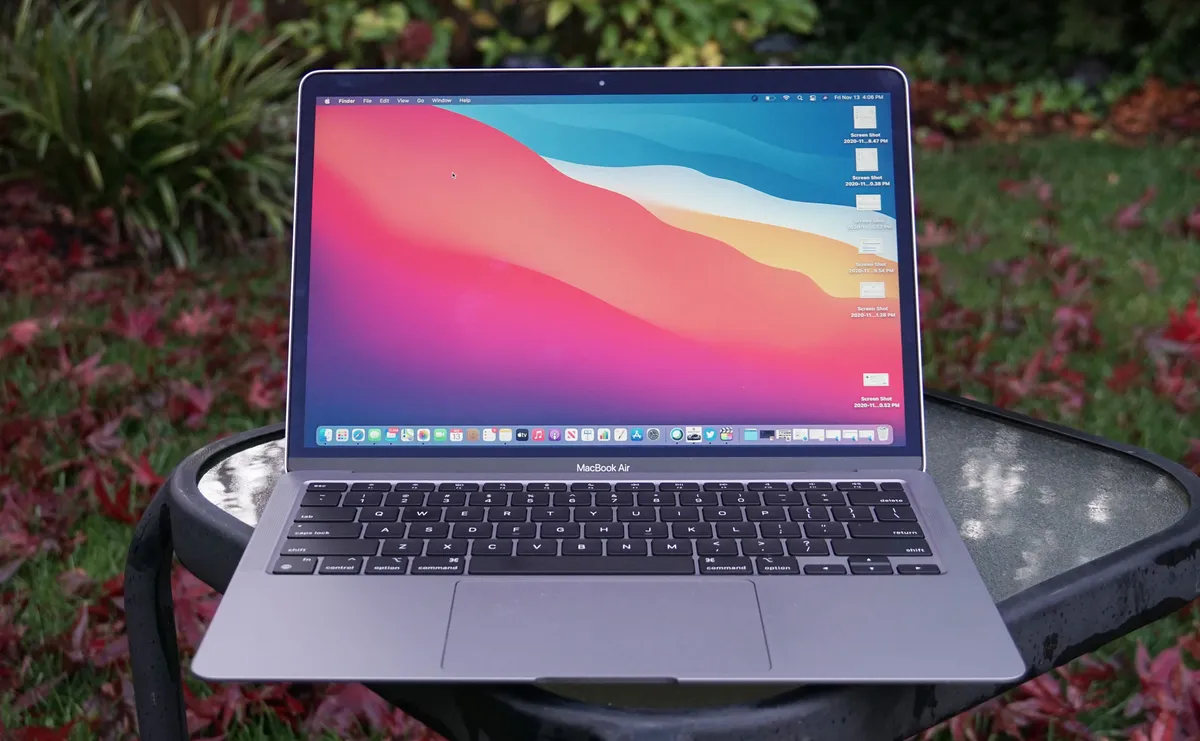
It’s worth noting that some folks are considering buying a refurbished MacBook Air M1 in preference to a MacBook Neo.
Assuming you can find a tempting deal on the Air M1, I get where that idea is coming from, but I’m not sure I’m at all convinced here. Mainly because the performance you’re going to get on this much older Air laptop won’t match up to the Neo (especially not for single-core, or the likes of casual gaming).
Granted, the MacBook Air M1 is more premium in its build — it boasts a backlit keyboard, for example, and a screen with that wide color gamut for more vivid greens and reds — but I think the Neo represents better value overall.
That’s particularly true when you consider support going forward, with the Air M1 coming towards the end of Apple’s support window for macOS updates, whereas the Neo is only just at the start of its life in this regard. Not forgetting that a refurb isn’t quite the same as a new piece of hardware, either.

The best laptops for all budgets
Follow TechRadar on Google News and add us as a preferred source to get our expert news, reviews, and opinion in your feeds. Make sure to click the Follow button!
And of course, you can also follow TechRadar on YouTube and TikTok for news, reviews, unboxings in video form, and get regular updates from us on WhatsApp too.
